BTEs can be used both by SAP, third part vensdors and
customers. Each use their own function modules where the logic is
placed, so they don't interfere witj each other
There are 2 types of BTE:
Publish & Subscribe interfaces. Can not update data.
Posiible to have multiple implementations
Process interfaces. Can update date. Only one active
implementation
How does it work
The BTE is a functionmodule (Implemented by the customer)
that has a standard interface defined by SAP. The BTE is
called by the SAP standard program by a call to function
OPEN_FI_PERFORM_<BTE-number> or
OUTBOUND_CALL_<BTE-number>. This function chekcs if
there are any active BTEs according to customizing.
How to find a BTE
Search the socurce code for for "OPEN_FI_PERFORM" og "
OUTBOUND_CALL_"
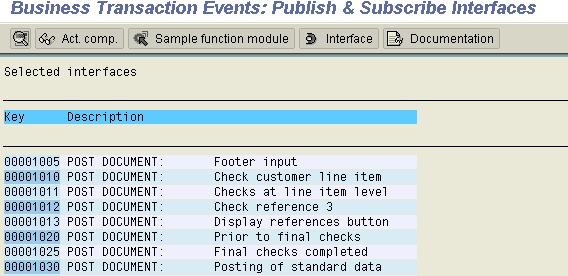
Use transaction FIBF menu Environment->Info System (P/S ).
Use the Documenttion button to see the documentation for the
BTE
Implementing a BTE
Goto transction FIBF menu Environment->Info System (P/S
)
Select the BTE you want to implement.
Press button Sample function
module
This brings you to SE37 - Copy the sample function module to a
Z-function module (First create a new function group for the
function module) . Note: The name of the Z-functionmodule is not
important
Edit the code in the new function module
Go back to transaction FIBF - Menu Settings->Products ->
Of a customer and create a
new product whicj identifies the new product . Remember to mark the
Active field.
Go back to FIBF menu Settings->P/S function modules->of a
customer - Create an entry that links the BTE and
Product with the new function module
Example:
We want to implement BTE 00001030. Locate it in trsnaction
FIBF
Press button Sample function
module . Copy function module in SE37 (First create a new
function group for the function module)
Edit the code in the new function module
Go back to transaction FIBF - Menu Settings->Products->Of a customer and create a new product
whicj identifies the new product
Remember to mark the Active field.
Save
Go back to FIBF menu Settings->P/S function modules->of a
customer - Create an entry that links the BTE and
Product with the new function module
Converted from CHM to HTML with chm2web Standard 2.7 (unicode)